Clean Up Arcade Fun
Reviews
💡Clean Up offers a straightforward yet addictive experience. The core loop of sucking up objects to grow larger is immediately rewarding. The timer adds urgency without causing stress, making each round feel like a fresh challenge. Unlocking skins provides motivation to keep playing, and the global leaderboard encourages friendly competition. The game runs smoothly on desktop and is suitable for all ages. It is a good choice for casual gaming sessions where you want quick, engaging fun without a steep learning curve.
Description
Game Introduction
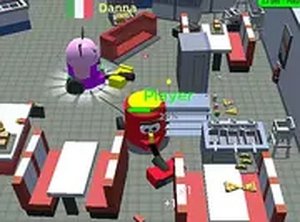
Clean Up is an online arcade game where players control a vacuum cleaner with the goal of sucking up everything in sight. Starting with small objects like trash and furniture, your vacuum grows larger as you progress, eventually allowing you to consume bigger items such as walls, cars, and even entire houses. The game challenges you to become the biggest vacuum cleaner possible before the timer runs out. It is a lighthearted, family-friendly experience that combines strategy, speed, and a touch of chaos.
How to Play
Playing Clean Up is simple. Use your keyboard or mouse to move the vacuum cleaner around the game world. Your mission is to suck up objects to earn points and increase your size. The bigger you get, the more you can consume. Start with small items like trash and furniture, then progress to larger objects like walls, cars, and houses. Keep an eye on the timer—you need to grow as much as possible before time expires. Unlock new skins by reaching milestones, and aim for the highest score to top the leaderboard. The game is designed for desktop play.
Game Features
Clean Up offers fun vacuum cleaner gameplay that is easy to learn. It features a progressive growth system that lets you start small and become huge. Multiple unlockable skins add variety to the experience. A global leaderboard allows you to compete with players worldwide. Timed challenges keep each session exciting and focused.
Tips for Success
To maximize your score, focus on sucking up objects efficiently. Prioritize larger items as your vacuum grows to gain more points quickly. Keep an eye on the timer and plan your route to cover as much area as possible. Practice moving smoothly to avoid wasting time. Unlocking skins can provide visual motivation, but the key to high scores is consistent growth and smart object selection.
Compatibility & Testing
Faq
Is Clean Up free to play?
Can I play Clean Up on mobile devices?
Are there any age restrictions for Clean Up?
How do I unlock new skins in Clean Up?
Does Clean Up have a multiplayer mode?
What happens when the timer runs out in Clean Up?
Similar Titles

Flying Saucer Arcade Game

Candy Burst Match 3 Puzzle
Wizard Jewels Match 3 Puzzle

Fruit Slasher Arcade Game

Halloween Jump Arcade Runner
Move the Box 2: Platform Puzzle
Bubble Shooter Marbles Puzzle