QT Rewired Rhythm Battle
Reviews
💡FNF vs QT: Rewired successfully revitalizes a classic mod with polished animations and two original tracks that are easy to enjoy. The gameplay is straightforward, requiring precise timing with arrow keys, and the mid-song cutscene breaks the monotony with a short narrative moment. While the content is brief, the challenge of achieving a high score encourages replay. The free browser-based format makes it accessible without any setup. It is a solid choice for fans of rhythm games looking for a quick, family-friendly musical challenge.
Description
Game Introduction
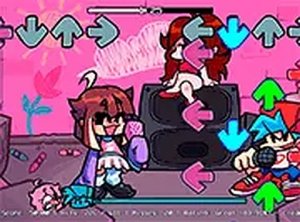
FNF vs QT: Rewired is a fan-made revival of a popular Friday Night Funkin mod. This rhythm game challenges players to press arrow keys in time with scrolling notes, matching the beat of two original songs. The game features revamped animations and a mid-song video cutscene that adds a modern twist while staying true to the original mod. Designed for desktop browsers, it offers a free and accessible way to enjoy a musical showdown. Whether you are new to rhythm games or a longtime fan, the game provides a straightforward yet engaging experience that focuses on timing and reflexes.
How to Play
To play, use your keyboard to press the up, down, left, and right arrow keys as they align with notes scrolling across the screen. Each correct hit increases your score and keeps the rhythm flowing, while missed notes may lower your performance. The game is optimized for desktop play, so a keyboard is recommended. You can also switch to full screen mode for a more immersive view. Simply load the game in your browser, choose a difficulty level if available, and start your musical battle against QT. Practice helps improve your timing and achieve higher scores.
Game Features
Game features include: revamped animations that refresh the visual style. Two original songs provide new music to enjoy. A mid-song cutscene adds a surprising narrative element. Free browser play means no downloads or installations are needed. Full screen mode offers an immersive experience.
Tips for Success
Focus on the beat and try to anticipate note patterns. Start on an easier difficulty if available to build muscle memory. Practice regularly to improve your reaction time. Keep your eyes on the center of the note track to see incoming arrows clearly. Stay relaxed and don't tense up, as this can slow your reflexes. If you miss notes, simply continue and try to recover the rhythm.
Compatibility
Faq
Is this game free to play?
Can I play on a mobile device or tablet?
What happens if I miss too many notes?
Are there different songs to play?
Do I need to install any software to play?
Can I change the game's speed or difficulty?
Similar Titles

Growth Creature Arcade
Escape Plan: Draw Puzzle

Quick Sides Reflex Challenge
Super Gem Breaker Match 3 Puzzle

Crossy Adventure Arcade Game
Goddess Idle Clicker Community

Fruit Slasher Arcade Game