Arena Racing 3D Driving
Reviews
💡Arena Racing 3D Driving offers a unique twist on driving games by focusing on physics-based interactions rather than racing. The controls are simple and responsive, making it easy to pick up. The slow-motion effects and vehicle switching add variety. It is perfect for casual gamers looking for a quick, entertaining session.
Description
Game Introduction
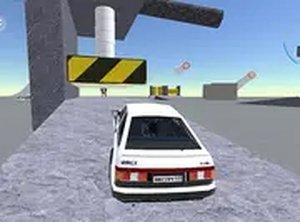
Arena Racing 3D Driving is a free browser-based driving game where players control a vehicle in a safe, open arena. The core objective is to use realistic physics to drive into other cars, creating dynamic and entertaining interactions. This game stands out by focusing on creative driving and collision effects rather than traditional racing, offering a unique twist on driving games. With no downloads required, it runs directly in your browser, making it easily accessible for quick gaming sessions. The 3D graphics and physics engine provide a visually engaging experience, while the arcade-style action keeps gameplay fast-paced and fun.
How to Play
To play, start by selecting a vehicle from the available options. Once in the arena, use the on-screen controls to drive, accelerate, and steer your car. The main goal is to aim your vehicle at other cars to cause interactions and effects. You can activate a nitro boost for a sudden burst of speed, which helps create bigger impacts. When a heavy interaction occurs, a slow-motion effect highlights the moment. If your car becomes too damaged, you have the option to repair it to continue playing. You can also switch to a different vehicle at any time during the game. The game continues as long as you want, allowing you to experiment with different strategies and enjoy the action.
Game Features
Features include a realistic physics engine that makes every interaction feel unique, a nitro boost for sudden speed increases, and cinematic slow-motion effects that highlight big moments. Players can switch between different vehicles on the fly and repair their car when it gets damaged. The game supports full screen mode for an immersive experience and requires no download or installation, as it runs directly in your browser. These features combine to create a fun and accessible arcade-style driving experience.
Tips for Success
To get the most out of the game, practice steering and timing your nitro boosts to maximize impact. Experiment with different vehicles to see which handles best for your play style. Use the repair option strategically to keep your car in good condition, especially after major events. Try to aim for head-on or side approaches to cause more effects. Finally, take advantage of the slow-motion effects to appreciate your best moments and learn from them. Regular practice will help you master the physics and enjoy the game even more.
Compatibility
Faq
Is Arena Racing 3D Driving free to play?
Can I play Arena Racing 3D Driving on mobile devices?
How many vehicles are available in Arena Racing 3D Driving?
Does Arena Racing 3D Driving have an end or a final goal?
Can I save my progress in Arena Racing 3D Driving?
What should I do if the game runs slowly on my computer?
Similar Titles

Growth Creature Arcade
Draw Path Puzzle Adventure

Quick Sides Reflex Challenge
Super Gem Match Puzzle
Monster Truck Trail Driving Adventure
Idle Goddess Community Builder

Crossy Adventure Arcade Game