
Reviews
Shoe Design Studio succeeds as a relaxing creative outlet. The interface is clean and responsive, making it easy to experiment with colors and charms. The ability to adjust each part of the shoe independently gives a surprising amount of control. The community sharing feature adds a nice social layer without feeling mandatory. It is a well-executed casual game that delivers exactly what it promises: a fun, free way to design personalized footwear.
Description
Design Your Own Footwear
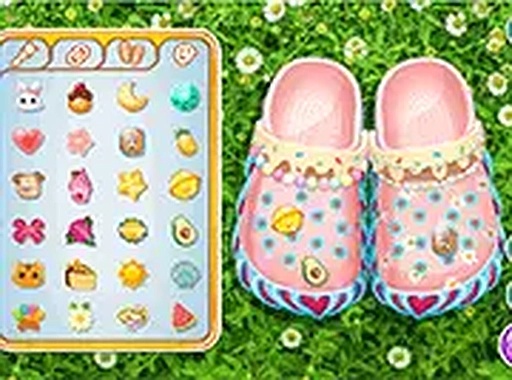
This browser-based activity puts the tools of a footwear designer at your fingertips. Starting with a blank canvas shaped like a classic shoe, you select from a broad spectrum of base colors to establish the foundation. From there, the real creativity begins. You can apply different hues to each section, including the sole, giving you control over the entire look. The interface is straightforward, allowing you to experiment freely without any complicated menus or tutorials.
Color and Pattern Selection
A wide palette of colors and patterns is available to transform the basic shoe into something personal. You can mix solid tones with patterned sections, creating contrasts that catch the eye. The system lets you adjust each part independently, so the body might feature a bright shade while the sole takes on a more subtle tone. This flexibility encourages trying out combinations that might not occur in a physical design process.
Straps and Charm Attachments
Beyond the base, you can add straps that come in various finishes, from glittery surfaces to patterned fabrics. These straps change the silhouette and add a layer of detail. Then, you can attach small charms to the shoe. The charm collection includes items like flowers, small animals, and fun symbols. Placing these decorations is a matter of clicking and positioning, allowing you to cluster them for a dense look or spread them out for a minimalist style.
Sharing and Community Interaction
Once your design is complete, a screenshot function captures the final result. You can then post this image to your profile within the game's community area. This feature lets you show off your work and see what others have created. It also provides a source of inspiration, as you can browse through designs made by other players. The community aspect is optional, so you can focus purely on the creative process if you prefer.
Accessibility and Platform Support
The game runs directly in a web browser on both mobile phones and desktop computers. There is no need to download any software or create an account to start playing. The controls are optimized for touch screens as well as mouse input, making the experience consistent across devices. Because it is free to use, there are no barriers to entry, and the entire experience remains family-friendly with no inappropriate content.
Comments
Sign in to comment
You must be logged in before posting a review or rating.
No account? Create one
No comments yet. Be the first to comment!