

Reviews
Audio Canvas: Beat Composer succeeds by removing all barriers to creativity. The drag-and-drop system is instantly intuitive, and the real-time audio feedback keeps you engaged. I appreciate that there are no scores or timers, which makes it a relaxing experience rather than a competitive one. The character animations that sync with the beat add a charming visual layer. While it lacks save or export options, the sheer ease of jumping in and mixing makes it a standout browser-based tool. It is an excellent choice for anyone curious about sound design or just looking for a peaceful creative outlet.
Description
Core Mixing Mechanics
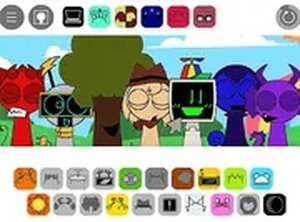
At the heart of Audio Canvas: Beat Composer is a straightforward drag-and-drop system. You start with a lineup of characters, each ready to receive a sound. Below, a palette of audio icons offers options like bass lines, percussion hits, and melodic phrases. To build a track, you simply click an icon and drag it onto a character. The character then plays that sound on a loop, synchronized with others. Removing a sound is just as easy: drag the icon off the character, and it goes silent. This immediate feedback loop encourages rapid experimentation, letting you hear changes instantly without menus or loading screens.
Creative Freedom and Exploration
This game thrives on open-ended creativity. There are no objectives, timers, or scores to chase. Every combination of sounds is valid, and some pairings produce unexpected harmonies or rhythmic surprises. The design invites players to treat each session as a blank canvas. You might start with a steady beat, layer a synth melody, then add vocal chops for texture. If something sounds off, you can mute individual layers without restarting. This low-pressure environment makes it ideal for both casual players and those curious about music production basics.
Visual Design and Audio Feedback
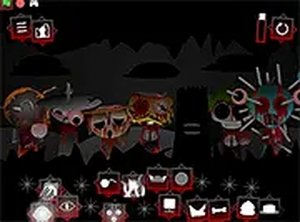
The characters in Audio Canvas: Beat Composer are visually distinct, each with a playful personality that matches their assigned sound. When a sound is active, the character animates in sync with the beat, providing a clear visual cue of which layers are playing. This synchronization helps players understand the structure of their mix at a glance. The interface is clean and uncluttered, with large icons that work well on touchscreens. A full-screen button removes browser distractions, letting you focus entirely on the audio experience.
Accessibility and Platform Support
Built with web standards, Audio Canvas: Beat Composer runs directly in any modern browser. There is no software to install, no account to create, and no hidden costs. It works seamlessly on desktop computers, tablets, and smartphones. The touch-friendly interface means you can mix on a phone during a commute or on a laptop at home. This universal access lowers the barrier to entry, making sound design available to anyone with an internet connection.
Learning Through Play
While primarily a creative tool, Audio Canvas: Beat Composer also serves as an informal introduction to music composition. Players naturally learn about layering, rhythm, and texture as they experiment. The game rewards curiosity: trying an unusual combination might reveal a hidden effect or a pleasing chord progression. This discovery-based learning model keeps the experience fresh and encourages repeat play. Parents and educators may find it a useful resource for introducing basic audio concepts in a fun, non-intimidating way.








Comments
Sign in to comment
You must be logged in before posting a review or rating.
No account? Create one
No comments yet. Be the first to comment!