
Reviews
Pull Plus Number Merge Puzzle offers a clean and calming experience for puzzle fans. The drag-and-launch mechanic is intuitive, and the gradual increase in difficulty keeps you engaged. The colorful visuals and free-to-play model make it an excellent choice for casual gaming. It is best enjoyed on a desktop for precise control.
Description
Game Introduction
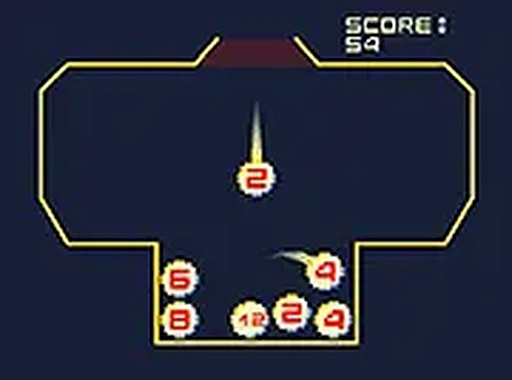
Pull Plus Number Merge Puzzle is a casual arcade puzzle game that focuses on strategic thinking and timing. The main objective is to combine numbered balls by launching them into each other, aiming to create a ball with a high value. What makes this game stand out is its simple drag-and-launch mechanic combined with number merging, offering a satisfying sense of progression as small numbers grow into larger ones. Designed for desktop play, it provides a relaxing yet engaging experience for puzzle enthusiasts. The game challenges players to plan their moves carefully, as each level requires reaching a specific target value to succeed.
How to Play
Players use their mouse to interact with the game. By clicking and dragging on a ball, you extend a power line; releasing the mouse button launches the ball with force proportional to the line's length. After launching, a new ball drops from the top center. The key is to make balls with the same number touch each other, causing them to merge into a single ball with the sum of their numbers. For example, two balls with the number 5 combine into a ball with the number 10. The level is cleared when you create a ball with a value of 1000 or more. However, if any ball stays too long in the red area at the top, the game ends, so careful planning is essential.
Game Features
This game features addictive number-combining puzzle gameplay with simple drag-and-launch controls. It has a clean and colorful visual design that is easy on the eyes. The game is free to play and supports full-screen mode for an immersive experience. It works best on desktop with a mouse for precise control. Each level offers a fresh challenge with increasing difficulty, providing hours of entertainment.
Tips for Success
To succeed in Pull Plus Number Merge Puzzle, practice your timing and aim to launch balls accurately. Focus on merging balls of the same number early to avoid clutter. Keep an eye on the red zone at the top and try to clear balls from that area quickly. Plan your moves ahead to create larger combinations efficiently. Regular practice will help you master the mechanics and improve your scores.









Comments
Sign in to comment
You must be logged in before posting a review or rating.
No account? Create one
No comments yet. Be the first to comment!